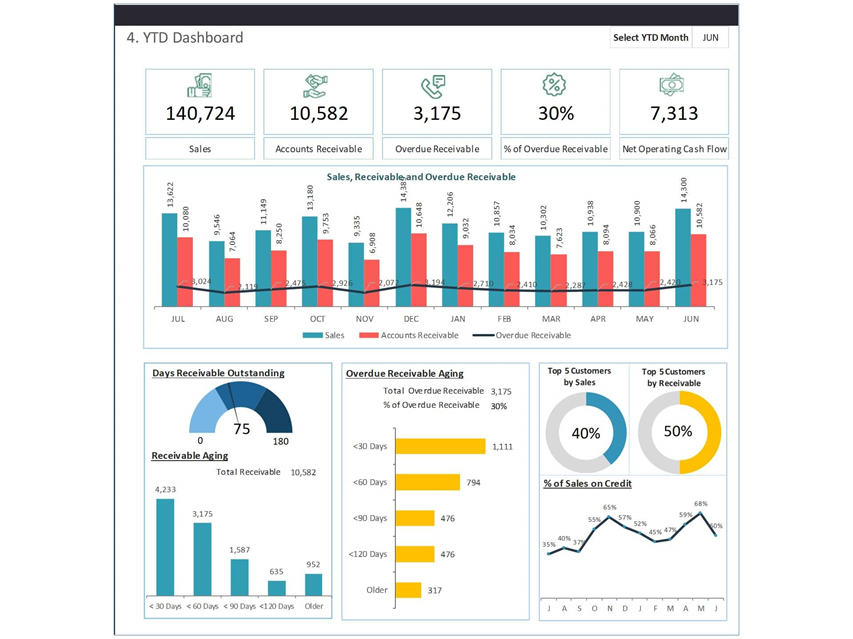
The Impact of Accounts Receivable on Cash Flow
The largest asset that companies display on their balance sheet alongside working capital management’s most crucial element is accounts receivable (AR). Operations stall when customers delay payments which also restricts growth and poses a threat to solvency. Receivables funds that sit idle cannot be utilized for payroll expenses or purchasing new assets or investment activities. The Accounts Receivable Dashboard plays a crucial role in maintaining good cash flow health.
Common Challenges in Managing Receivables
Multiple businesses face problems with late-paying customers along with unclear payment tracking and irregular follow-up procedures. Common challenges include:
- Manual tracking of outstanding balances
- Poor communication between finance and sales teams
- No centralized system for prioritizing collections
- Difficulty predicting payment behavior
The combination of these issues results in longer Days Sales Outstanding (DSO) periods and cash flow shortages as well as strained customer relations.
Key Benefits of Using an Accounts Receivable Dashboard
Real-Time Visibility into Outstanding Invoices
A properly designed AR dashboard provides real-time access to aging reports together with invoice status details and total outstanding invoice amounts. You no longer require manual navigation through spreadsheets or accounting software tabs. The ability to track past-due invoices and future payments alongside historical patterns enables finance teams to maintain their position ahead of collections.
Enhanced Communication with Customers and Sales Teams
The collection process depends on customer service and account manager or sales representative information which Finance receives. The AR dashboard operates as the single reliable information center that enables internal teams to achieve collection strategy coordination. A reliable system supports customer interactions through updated invoice details combined with payment records.
Reduced Days Sales Outstanding (DSO)
An AR dashboard exists to support companies in getting paid speedily. Businesses that enhance their visibility and implement better prioritization and accountability systems can decrease their DSO thus enabling them to free up cash for investment or operational spending. Organizations with shorter Days Sales Outstanding typically maintain better cash flow and financial stability.
Essential Metrics to Track in an AR Dashboard
Total Receivables and Aging Summary
Your dashboard should begin by presenting a breakdown of total receivables alongside aging periods which should include buckets for 0–30 days, 31–60 days, 61–90 days and >90 days. Your dashboard provides an immediate view of your AR status which enables you to determine if past-due payments persist or appear only occasionally.
Days Sales Outstanding (DSO)
The average duration which passes before your business receives payment following a sale is measured through DSO. The key performance indicator serves as a dual indicator of both customer payment habits and internal operational performance. An increasing DSO level suggests problems exist either with your collection methods or with your credit management systems.
Collections Effectiveness Index (CEI)
The Collections Effectiveness Index measures how well your business collects receivables during a specified period relative to the total collectible amount. The key difference between DSO and CEI is that CEI demonstrates the actual results of your collection procedures instead of measuring typical collection duration. A 100% CEI indicates complete collection of all available amounts.
Top Outstanding Customers
Your knowledge about the largest amount each customer owes enables you to focus your outreach efforts while checking their credit terms. Your dashboard must provide options to view data by customer name together with outstanding balance amounts and aging status information. Your finance team can use this capability to detect critical accounts which threaten your cash flow and high-risk accounts that require immediate attention.
Payment Trends and Dispute Rates
Customer payment patterns throughout time will reveal behavioral changes by monitoring their payment timing from early to late or on time. The tracking of disputes as well as partial payments and returns enables collection delays to be monitored. When you include relevant data points in your dashboard you gain better insights into AR-related difficulties and business possibilities.
Integration with ERP or Accounting Software
Manual updates lead to delays and errors. Dashboards that connect with software platforms including QuickBooks, NetSuite, Xero and SAP extract current data while maintaining precise information. When integrated with other systems the dashboard provides a single source of truth that decreases manual work while saving time and improving output accuracy.
The implementation of an AR dashboard provides enhanced collection strategies.
High-Risk or High-Value Account Prioritization is the Main Objective.
Your AR dashboard enables the integration of financial metrics with customer data for the identification of accounts that pose the most risk or offer the most value. For example:
- The accounts which have high balances together with overdue invoices that extend over long periods.
- The accounts that demonstrate a pattern of delayed payments on multiple occasions.
- Strategic accounts that feature big orders together with prolonged payment periods
The finance team can implement customized collection methods by using strong follow-up procedures for risky accounts alongside strategic outreach programs for high-value clients.
Alignment of Credit Control with Sales Operations
The goals between sales and credit departments differ because sales personnel focus on deal closure yet finance staff concentrate on payment collection. The creation of a unified AR dashboard enables teams to resolve their conflicting goals. Sales representatives leverage this platform to monitor account wellness along with payment expectation management during sales discussions. Credit controllers use this platform to determine whether they should increase or decrease credit lines through real-time data analysis.
Tools for Building AR Dashboards
The Small and Midsize Businesses can use Excel Dashboards as Their Financial Tool
Excel maintains its widespread adoption because users find it both adaptable and easy to access. The combination of pivot tables with conditional formatting and slicers enables you to construct a strong AR dashboard without programming knowledge. The dashboard requirements of small to midsize businesses can usually be met through Excel-based dashboards especially when they are updated once a week and integrated using Power Query.
Better AR Visibility Drives Cash Flow Improvements.
Effective accounts receivable management stands as the fastest method for businesses to enhance their cash flow performance. Real-time data visualization through an AR dashboard enables you to make strategic decisions while improving team communication across different departments. The proactive management of receivables through your dashboard allows you to achieve quantifiable improvements in DSO and working capital performance.
The process to create your own Accounts Receivable Dashboard begins now.
The first step toward implementing an AR dashboard should be to begin with basic functionality. Use Excel to create a basic dashboard by adding your aging report data and then expand it further. Establish essential performance indicators while creating your follow-up strategy and make sure to include representatives from finance, sales and customer service departments. The implementation of Power BI tools along with ERP system connections will allow you to develop automated scalable solutions over time. Bizinfograph offers ready-to-use dashboard templates on Finance, Sales, HR and Manufacturing.