Quick answer: Compare rent payment platforms in the order things can go wrong. First, will your landlord accept payments this way and receive them on time? Next, what does your chosen method cost each month, what proof do you get, and how does the platform protect your data and account? Only then weigh extras such as rewards or credit reporting. Extras count only once the basics work, and their terms can change, so read the current ones.
Rent payment platforms have multiplied in Canada, and their home pages tend to lead with extras: points, cash back, credit building. Those can be worth having. But a platform that pays your landlord late, costs more than you expected or leaves you without proof of payment is a poor deal, whatever it rewards.
A simple way to compare is to treat the decision as a series of gates. A platform has to pass each gate before the next one matters. This guide walks through the gates in order, with the questions to ask at each.
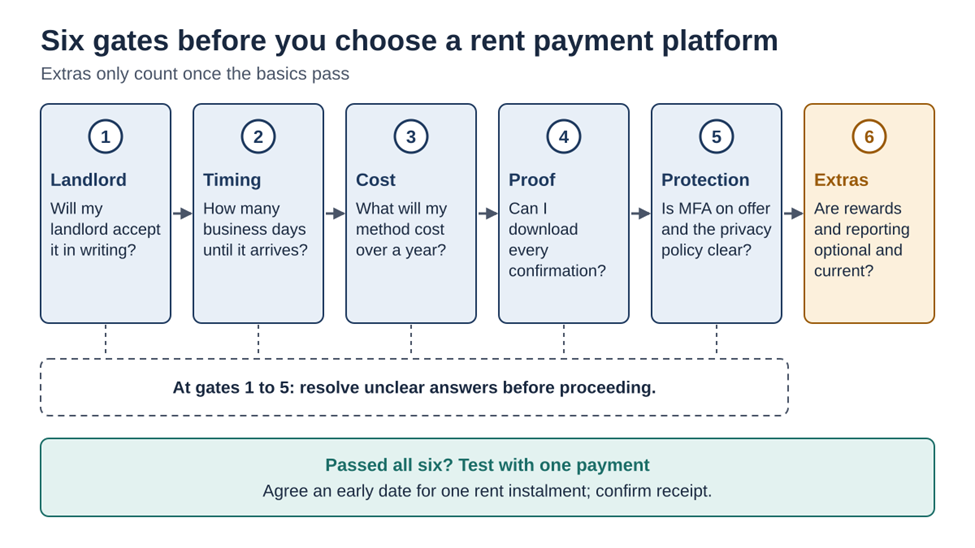
Six gates a rent payment platform should pass before its extras count.
Gate 1: Will Your Landlord Accept It?
Your lease sets out how rent is paid, and changing the method usually needs both sides on board. In Ontario, for instance, the Landlord and Tenant Board’s guide to the Residential Tenancies Act says a payment method agreed between landlord and tenant cannot change unless both of them agree.
Some platforms pay your landlord’s bank account directly, even if the landlord has never signed up. That is convenient, but tell your landlord before the first payment arrives from an unfamiliar source, and get their agreement in writing.
Gate 2: Will the Money Arrive on Time?
Ask how many business days each method takes to reach your landlord, and whether weekends and holidays add to that. Check whether your lease treats the due date as the day rent is sent or the day it arrives; if it is silent, plan for arrival. Bank payments clear and settle in stages, and in Payments Canada’s batch system institutions settle what they owe each other on the next business morning. Pay a few days early until you have seen how long the platform really takes.
Gate 3: What Does It Cost You?
Look up the fee for the method you will actually use, not the lowest fee on the page. Then work out a year’s cost: a percentage fee rises with your rent, while a flat fee does not. If you plan to pay by credit card, remember the FCAC’s explanation that an interest-free purchase grace period depends on the transaction and account terms, while cash advances can attract interest immediately. Confirm the classification and clear the full statement balance on time; interest can wipe out a reward.
Gate 4: What Proof Do You Get?
You should receive a confirmation for each payment showing the amount, date and status, and you should be able to download your history. Check what happens to that history if you close your account. Keep your own copies as well, since you may need them for a dispute or a future rental application.
Gate 5: Are Your Data and Account Protected?
Read the privacy policy for what is collected, who it is shared with and where it may be processed. Check that you can turn on multi-factor authentication, which the Canadian Centre for Cyber Security explains as signing in with at least two different kinds of factor, such as a password plus a code from an authenticator app. If the platform debits your bank account, keep a copy of your pre-authorized debit agreement.
Gate 6: Are the Extras Worth It to You?
Only now do the extras count. Common ones include:
- Rewards or points. Ask how they are earned, what they are worth, whether they expire and whether the program can change.
- Credit reporting. Ask which credit bureau receives your payments, whether reporting is optional, whether late payments are included and how to switch it off.
- Card rewards. Paying by card may earn your card’s own rewards, but that helps only if the fee and any interest are covered.
TenantPay shows one way these extras can be packaged. Its site describes a loyalty program for renters, payment by pre-authorized debit or card, and an optional Equifax reporting setting that the renter controls and, according to its site, can switch off at any time. Rent goes to the landlord’s bank account even if the landlord has not joined. Like any program, its fees and reward terms are published on its site and can change, so compare the current versions against your own numbers.
Warning Signs While You Compare
Some patterns are worth a second look, whichever platform shows them:
- Fees that appear only at checkout. Every method’s fee should be visible before you enter payment details.
- Extras switched on by default. Credit reporting or marketing sharing should be your choice, explained in plain words.
- No way to download your history. If you cannot export confirmations, you depend on the platform for proof.
- Vague answers about delivery times. “Fast” is not a number of business days.
- Pressure to decide quickly. A limited-time bonus is not a reason to skip reading the terms.
Try It With One Payment
Once a platform clears the gates, test it before committing. For one actual rent instalment, agree a suitable early payment date with your landlord, note when it leaves your account and when your landlord confirms receipt, and check that the confirmation and any fee match what you were told. Use that trial to check the workflow, while remembering that one successful payment does not prove every future payment will arrive on time.
A Simple Comparison Worksheet
| Gate | Question to ask | A deal-breaker answer |
| Landlord | Will my landlord accept this method in writing? | No |
| Timing | How many business days until my landlord receives it? | Longer than I can plan around |
| Cost | What will my method cost over 12 months? | More than I am willing to pay |
| Proof | Can I download every confirmation? | No |
| Protection | Is MFA available, and is the privacy policy clear? | No |
| Extras | Are the terms clear, optional and current? | Unclear or not optional |
Conclusion
The best rent payment platform for you is the one that clears the basic gates first: your landlord accepts it, the money arrives on time, the cost is clear, you get proof and your data is protected. After that, extras such as rewards and credit reporting can tip the balance, provided they are optional and their terms are current. Compare two or three platforms against the same worksheet, and revisit the choice whenever your rent, landlord or payment method changes.
Frequently Asked Questions
Do I need my landlord’s permission to use a rent payment platform?
You should get your landlord’s agreement, especially if the platform changes the payment method set out in your lease.
Is credit reporting automatic on rent platforms?
It varies. Some report only if you opt in. Ask which bureau receives the data and whether late payments are reported.
Are rent rewards guaranteed?
No. Rewards depend on each program’s current terms, and those can change.
What if my landlord accepts e-Transfer at no cost?
Then weigh the platform’s fee against what its extras are worth to you. Free and simple may be the better choice.
Can I switch back to my old payment method?
Usually, if your landlord agrees. Find out how to cancel any recurring payments on the platform first.